
StudyFetch aims to help with engagement outside class by using artificial intelligence to turn existing course materials into a range of interactive learning resources. Students can upload notes, presentations, PDFs, and lecture recordings, then use the platform to create flashcards, quizzes, study guides, videos, and more.
The platform also includes an AI-powered tutor called Sparky, which can help explain difficult concepts, answer questions, and guide students through their learning. For teachers, there are additional tools for creating lesson plans, worksheets, and assessments, as well as options for providing students with personalized AI assistance.
While StudyFetch is designed primarily to support independent study, its collection of tools could also be useful in the classroom, helping educators differentiate activities, reinforce key concepts, and give pupils more opportunities to practice.
So, what exactly is StudyFetch, what does it offer, and how can you use it to support teaching and learning?
What is StudyFetch?
StudyFetch is an AI-powered learning platform designed to help students understand, organize, and revise their course materials. It provides a collection of tools that can turn existing learning resources into different formats.
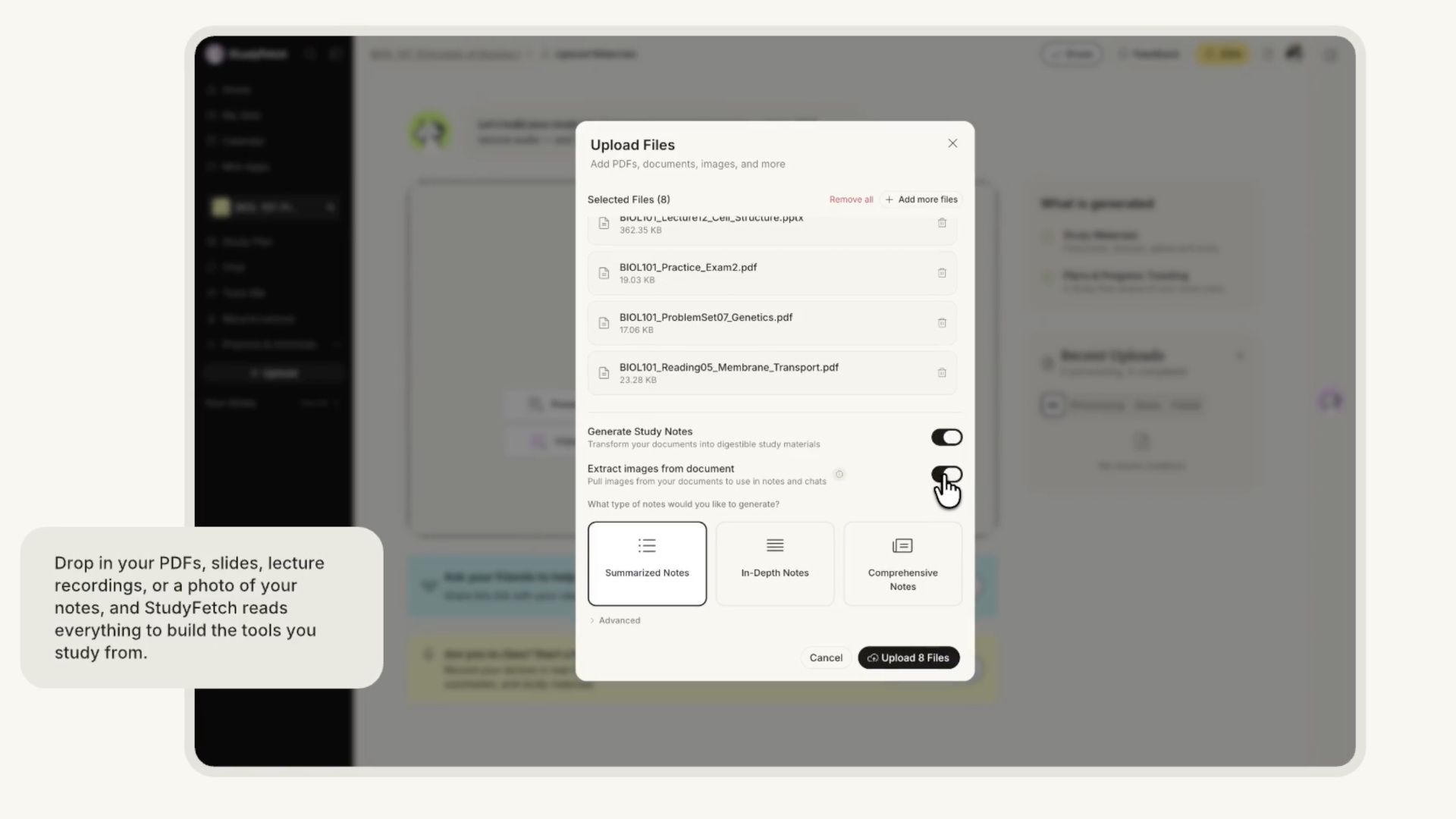
Students can upload PDFs, PowerPoint presentations, lecture recordings, videos, and written notes. The platform then uses these materials to generate resources including structured notes, flashcards, quizzes, practice tests, and study guides.
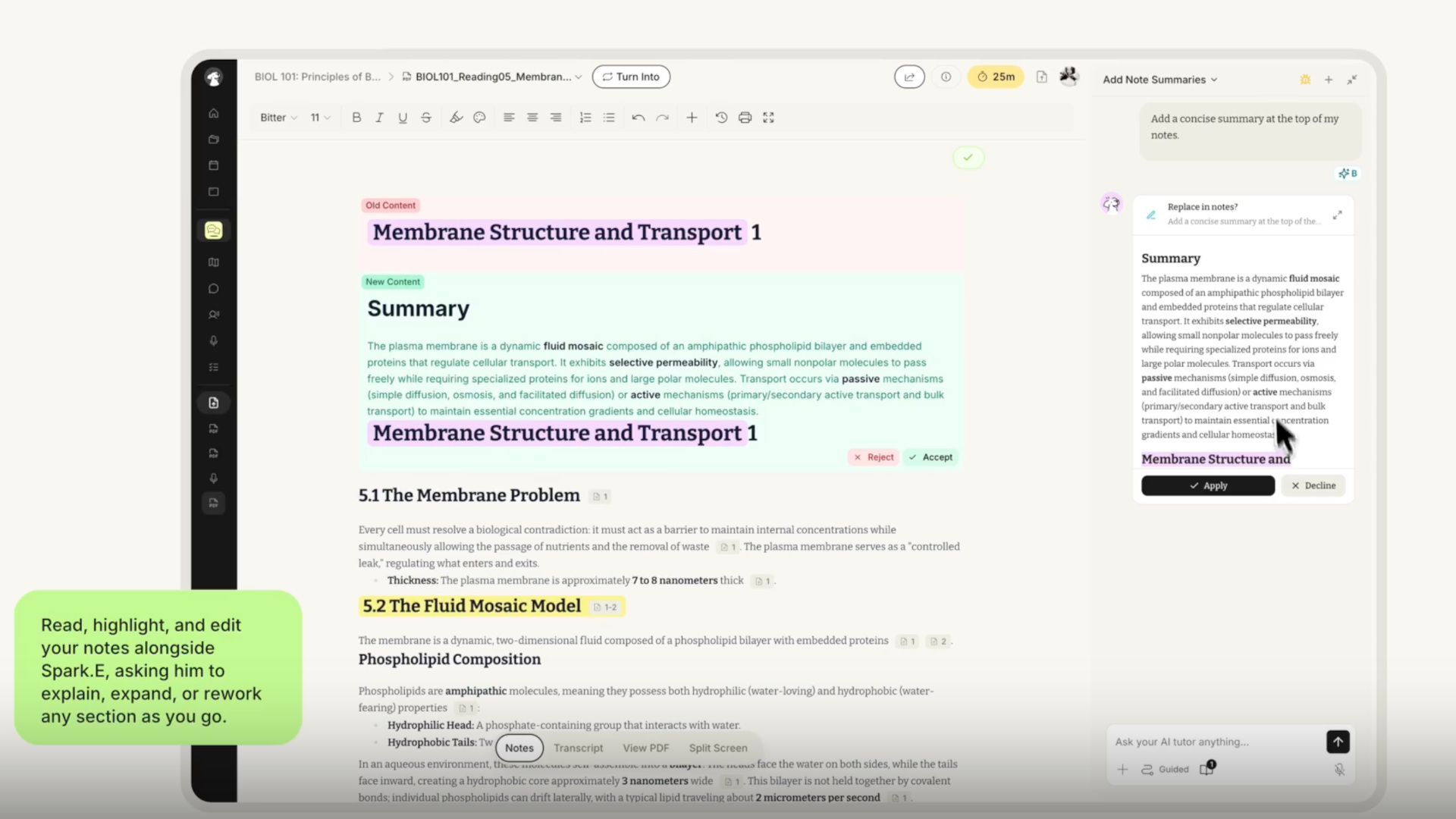
One of its central features is Sparky, an AI learning assistant that can answer questions about uploaded materials and explain topics in different ways. Students can ask for help understanding a particular concept, request further explanations, or work through questions to check their knowledge.
StudyFetch also includes tools for teachers. Educators can use their own course materials to generate vocabulary lists, multiple-choice quizzes, worksheets, and lesson plans. In addition, it offers the option to create a customizable AI teaching assistant that students can access for additional support.
The platform is available through a web browser and mobile apps, allowing students to access their study materials across devices.
How does StudyFetch work?
Getting started with StudyFetch involves creating an account and uploading the learning materials with which you want to work. These can include documents, presentations, notes, videos, and other course resources.
Once uploaded, the materials can be used to generate different types of learning activities. For example, a teacher could upload a chapter from a science textbook and create a set of revision notes, flashcards, and a quiz based on its contents.
Students can then use those resources to work through the subject independently, revisiting information in different formats to help reinforce their understanding.
The platform’s AI assistant, Sparky, provides another way to engage with the material. Students can ask questions, request simpler explanations, or explore a topic in greater depth. They can access Sparky to work through ideas and identify areas they need to understand better.
For teachers, the dedicated educator tools offer a different experience. By uploading their own teaching materials, educators can generate lesson plans, worksheets, and vocabulary lists, as well as multiple-choice assessments. This provides a way to turn existing resources into additional classroom activities without having to create everything manually.
StudyFetch also supports integration with learning management systems, including Canvas, Blackboard, Schoology, D2L Brightspace, and Google Classroom, through its institutional offering.
What are the best StudyFetch features?
AI-generated notes: One of the most useful features is the ability to turn uploaded course materials into structured notes. Teachers can use these to create alternative versions of learning materials, while students can generate summaries to help them review important information. Different levels of detail are available, making it possible to create more concise or comprehensive notes.
Flashcards and quizzes: StudyFetch can automatically generate flashcards and quizzes from uploaded material. These provide students with opportunities to test their knowledge, identify gaps, and revisit information. The platform also supports spaced repetition, helping students return to material they haven’t yet mastered.
Sparky AI tutor: Sparky is the platform’s AI-powered learning assistant. Students can ask questions about their course materials, request explanations, and work through difficult concepts. This is useful when pupil work independently and need additional guidance outside teacher-led instruction.
Practice tests: Students can generate practice assessments based on their learning materials, with options for different question formats. This provides an opportunity to prepare for examinations and check understanding before moving on to new topics.
AI lesson planning and worksheets: The educator-focused tools allow teachers to generate lesson plans, worksheets, vocabulary lists, and multiple-choice quizzes from their own materials. This could help reduce preparation time while providing additional activities that relate directly to what students are learning.
Audio recaps and explainer videos: Not everyone learns best by reading. StudyFetch can turn learning materials into audio summaries and AI-generated explainer videos, offering alternative ways for students to engage with information. These could be useful for revision, homework, or reinforcing concepts introduced during lessons.
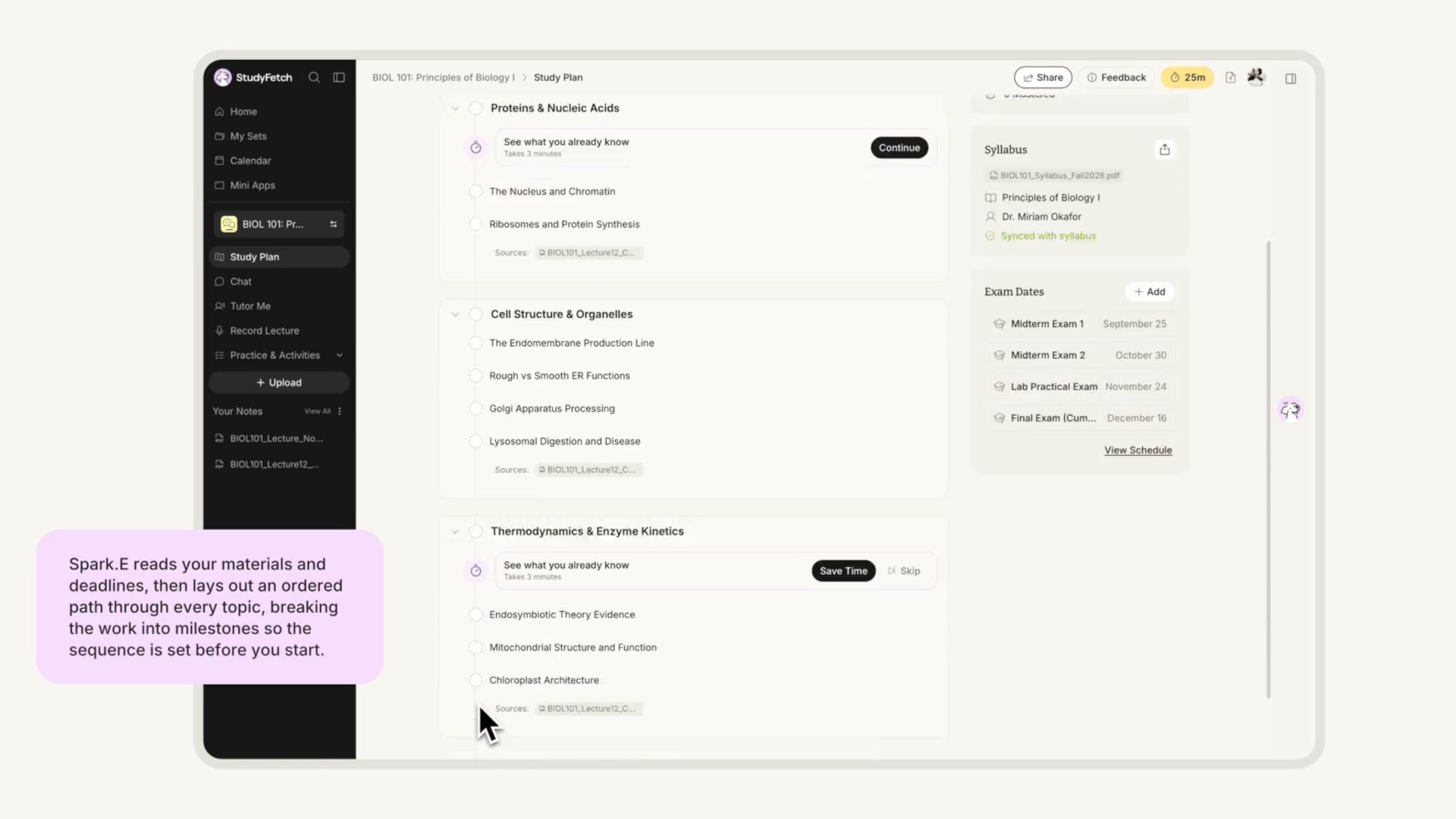
Study plans and progress tracking: StudyFetch can help students organize their learning around topics and deadlines. Its study planning tools break larger amounts of material into manageable tasks, while progress tracking helps identify which areas have been covered and which still need attention.
Arcade: For a more playful approach, Arcade turns learning materials into interactive games. This provides another way for students to revisit information and practice recalling what they have learned, to potentially make revision more engaging.
How much does StudyFetch cost?
StudyFetch offers a free starting option, allowing users to create an account, upload materials, and try its collection of study tools. It has limitations, and paid subscriptions provide access to more generations and additional functionality.
Premium subscriptions are available through the mobile app. U.S. App Store listings show a monthly Premium subscription at $19.99 and an annual option at $99.99. Prices and available plans may vary depending on where and how you subscribe.
Schools and educational institutions interested in the dedicated educator and enterprise features can contact StudyFetch for further information about its institutional offering.
StudyFetch Tips
- Start with your existing teaching materials
Rather than creating everything from scratch, upload resources you already use in class. A presentation, worksheet or textbook chapter can provide the basis for additional notes, quizzes and revision activities. - Create different levels of revision material
Try generating both concise summaries and more detailed notes from the same material. This can give students different ways to approach a topic and help you provide additional support where needed. - Use quizzes to identify knowledge gaps
Generate short quizzes after introducing a new topic. Students can use these to check their understanding, while teachers can use the results to identify areas that might need further explanation or practice. - Encourage students to question Sparky
Rather than treating the AI tutor as an answer machine, encourage students to ask follow-up questions, request examples and explore why something works. This can help make AI a tool for developing understanding rather than simply completing tasks. - Make revision more varied
Not every student will respond to the same learning format. Try combining flashcards, audio recaps, explainer videos and interactive games to give students different ways to revisit the same subject.
